



Description
Our customers' networks are becoming increasingly larger and more complex. Hardware alone is insufficient for such infrastructure to function properly. Therefore, in addition to manufacturing equipment for building communication networks, we developed Eltex Cloud Configuration Manager (ECCM), an intelligent tool for centralized management and monitoring that integrates all devices into a single managed environment.
ECCM is designed to simplify network operations and reduce engineer workloads by automating processes. Let's explore the system's key features and advantages.
Solution architecture
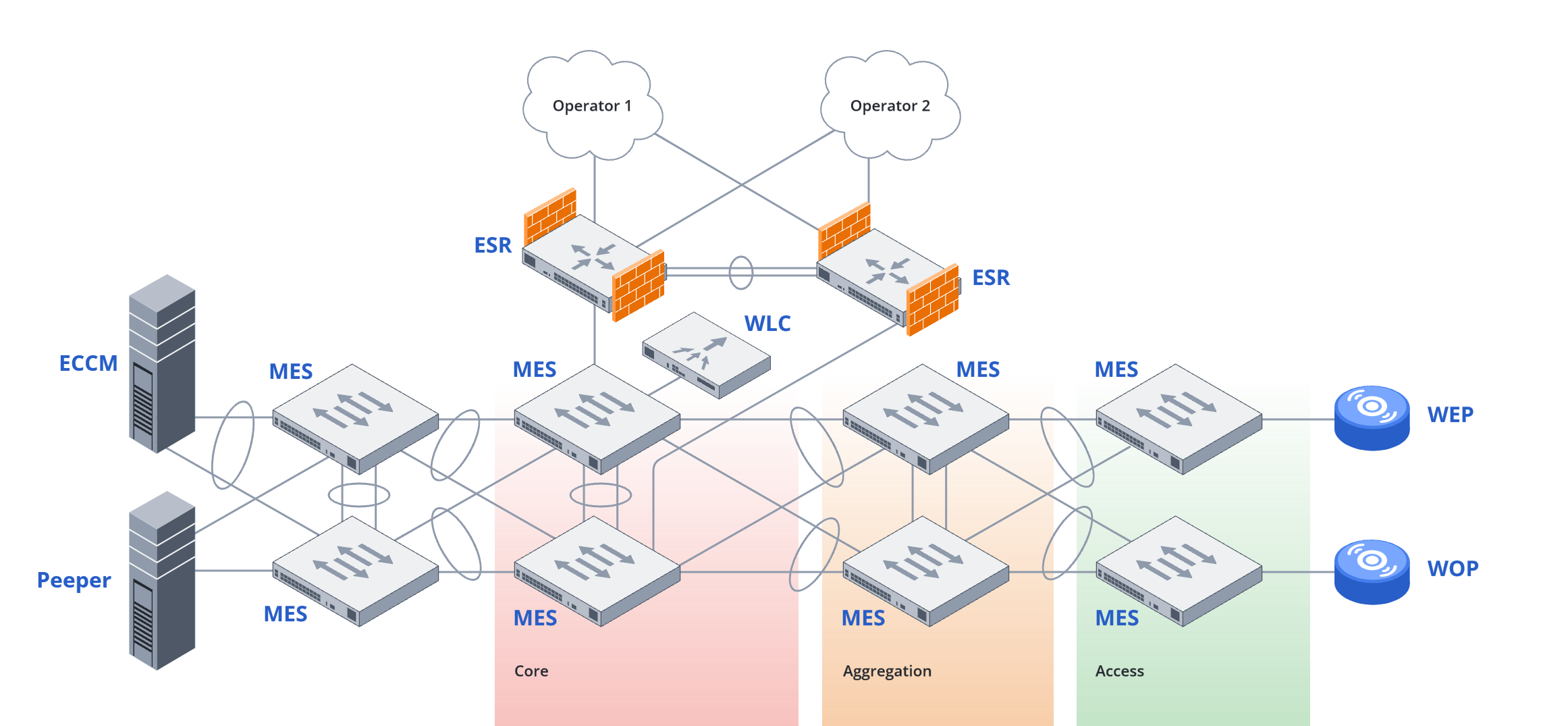
ECCM integrates major network administration services, creating a unified managed environment for Eltex or third-party equipment.

Management is carried out through a user-friendly web interface. The workspace allows creating custom monitoring rules, dashboards, and filters.
Equipment monitoring and network topology
ECCM collects real-time information from connected equipment, such as availability, the number of interface errors, device parameters, etc.

The option to build a network topology based on the LLDP protocol, displaying the relationships between items, is now available. The map clearly shows the current state of the infrastructure: color labeling enables rapid identification of trouble areas. Brief inventory information and the current status of devices are available; all of this can be viewed right on the map without the need to move to other sections. The network map also shows active issues, the VLAN structure, and the status of connections between devices. It is possible to conveniently search for devices by VLAN and device properties. The map can be exported if needed.

The system processes a vast amount of data — millions of SNMP traps and Syslog messages are continuously received daily. These are intelligently processed, and events are generated based on this processing. This makes it easier for the administrator to distinguish critical incidents from changes that don't affect the network. A built-in rule and problem designer is also provided for this purpose. The user defines the conditions under which ECCM will automatically generate an event or log a problem. Over 500 event types and 75 standard problems are automatically generated.
When problems are detected, ECCM notifies administrators via built-in notifications in the web interface, as well as by email and Telegram.
Configuration and update management
The solution's core capability is automation of administrator tasks. ECCM simplifies equipment fleet management: from initial device configuration to centralized firmware updates across multiple nodes.

The system enables mass deployment of settings and updates using templates and group policies, as well as the scheduling and automation of these processes, minimizing the need for manual actions. A version control mechanism logs all configuration changes and allows for comparisons of the current state with previous versions and across different devices. A backup configuration can be restored if needed.
ECCM provides a user-friendly web interface for equipment administration, allowing administrators to configure devices without CLI syntax understanding. With each new release we introduce new configuration capabilities using web forms. The system includes features such as firewall configuration on ESR routers, wireless network configuration on WLC controllers, quick interface and VLAN configuration on MES switches, and more.
Firmware management is implemented via a centralized repository where firmware versions are stored, applied, and swapped; the system automatically detects the hardware model and the corresponding firmware version.
Security and access management
Security is based on a role-based management model that defines administrator privileges. In addition, ECCM includes user action logging, which allows auditing of network administrator activity.
ECCM supports authentication using both a local user database and third-party directories, such as Microsoft Active Directory and LDAP. With local authentication, all credentials are stored encrypted in an internal database.
Self-managed solution with Peeper module
The Peeper module monitors the server environment where ECCM is deployed. It collects OS, container, and database metrics to provide a complete picture of the system state and notify the administrator of any potential deviations. This gives control over both the network infrastructure and ECCM. We described Peeper functionality and advantages in this article.

Compatibility with equipment
ECCM was originally designed as a universal control and monitoring system tailored to Eltex equipment. It is fully compatible with the company's main product lines: MES switches, ESR service routers, and ME backbone routers, as well as with wireless solutions like WLC controllers, WB wireless bridges.
ECCM is also open to third-party equipment. The system supports standard SNMP and Syslog protocols, allowing for the integration of devices from other vendors into the overall environment.
General solution scheme