



Description
Radio signals are unpredictable: their quality depends on the terrain, interference from neighboring transmitters, weather conditions, and other factors. For broadband wireless access (BWA) network engineers, this means staying on top of things and monitoring all metrics. BWA networks are usually distributed across various sites, making administration inconvenient.
Therefore, a platform that helps monitor equipment is often necessary for such networks. In the Eltex ecosystem, the ECCM solution takes on this function. This software allows monitoring devices and updating firmware from a single point. The features of the solution are described below.
Solution architecture
The current version of ECCM provides essential functionality for BWA network administration, including device status monitoring and network topology mapping.
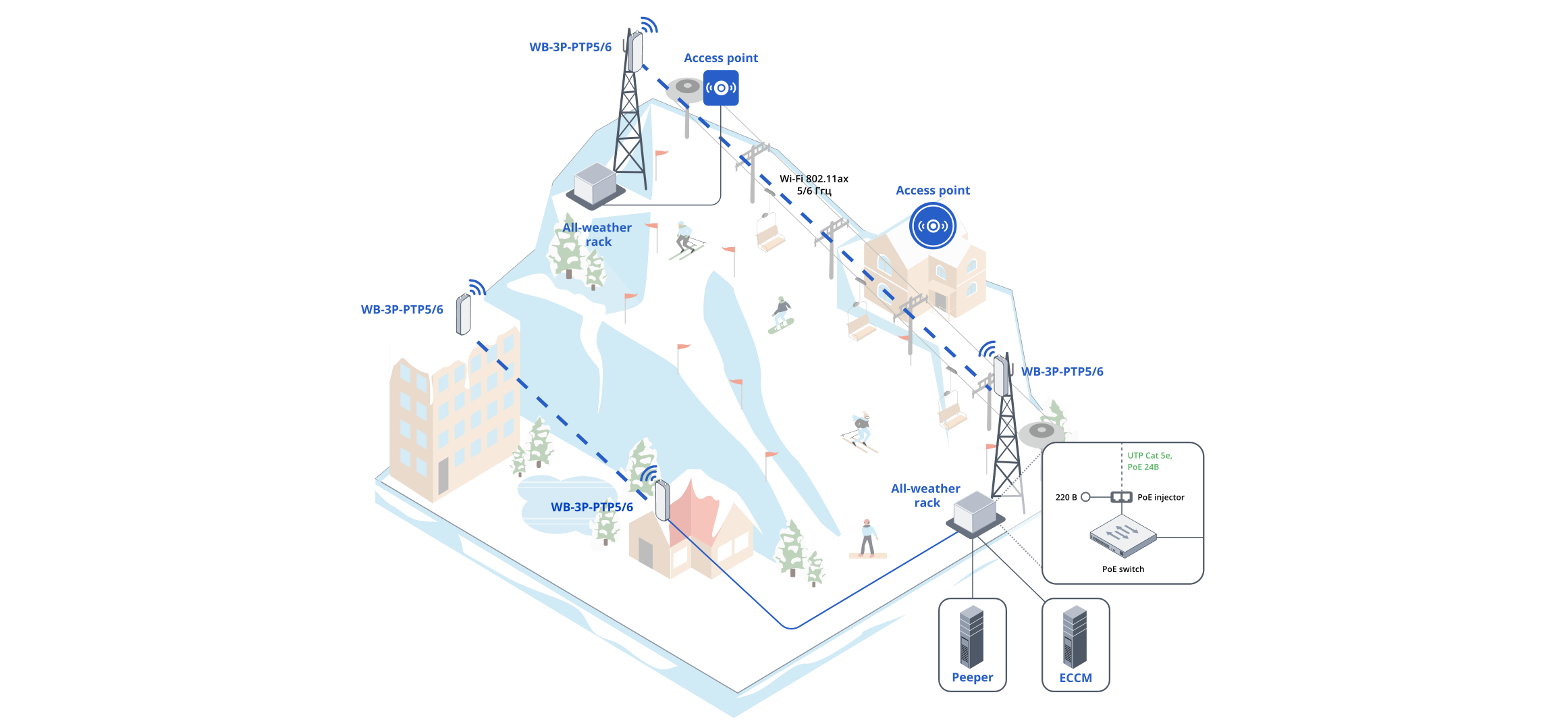
Currently, the system supports Eltex wireless bridges like WB-3P-PTP2, WB 3P-PTP5 and WB-3P-PTP6. We are actively expanding the list of compatible equipment and can add support for new models based on customer requests.

The system is accessed via a user-friendly web interface.
Equipment monitoring
ECCM provides the necessary functionality to monitor the network. The system collects the following metrics:
- device availability and connection status;
- RSSI, SNR;
- channel transmit and receive rates, connection quality;
- channel width and utilization;
- IEEE 802.11 operating mode;
- distance between radio bridges or between access points and client devices;
- interface load statistics and parameter change dynamics;
- interface errors and real-time radio link status.
Collecting metrics is important, but it is equally crucial to continuously monitor them. ECCM eliminates the need for constant manual oversight. It provides over 30 pre-configured events and problems related to wireless channel parameters. If connection quality degrades, the system will automatically notify the administrator about the impending problem.

The system processes large volumes of data using SNMP and Syslog, automatically filters and aggregates messages and generates events. In case of an error, ECCM sends a notification in the web interface, via e-mail or in Telegram.
Network topology
One of the key features of the system is network mapping. This mechanism allows administrators to better navigate the extensive equipment fleet.
The topology is designed based on the LLDP protocol. Connections between equipment are specified in ECCM. By clicking on a device, administrators can immediately see basic inventory information.
All errors are indicated on the map with color. For example, blue indicates that the equipment is working properly, while red indicates a problem. With the release of new versions, we support other color indications. For instance, in version 2.5, we will add orange to signal non-critical problems on the link, as well as gray for cases when link information is not available.

For the BWA segment, the map clearly shows the location of radio bridges and connected client wireless devices. If necessary, it is also possible to add broadband equipment.
Device page
Each device in ECCM has its own detailed page where basic information is available for viewing. The administrator can track:
- Radio interface: operation in 802.11 mode, channel being used, channel width, power;
- Link quality graphs: RSSI, SNR, bandwidth, data transmission and reception speed;
- Channel utilization and load dynamics;
- Information on clients connected to the radio bridge;
- Distance between access points.
Current problems and event history are displayed in a special tab.
Update management
ECCM provides centralized equipment firmware update. The administrator can launch updates for a large number of devices at once, based on specified templates and policies.

All firmware versions are stored in a common repository, from where they are applied as needed.
Self-managing solution using Peeper
To ensure stable operation of the entire infrastructure, it is also necessary to monitor the status of the server environment where ECCM operates. In the considered solution, this is done using the Peeper module. Peeper monitors the status of the server environment where ECCM operates: tracks parameters of Eltex software solutions, containers and databases, collects technical metrics and detects any deviations in operation.
Administrator obtains information on the whole infrastructure. Both equipment and the ECCM itself are monitored. Learn more about Peeper here.
General solution scheme